Customer Overview
Our long-term customer, Parnells, is a leading seller across Europe, specialising in tyres, car parts, and a wide range of automotive products. We have been working closely with Parnells for many years, delivering continuous customisations, automation, and technical support. Their business operations are powered by our advanced integrations, including:
- ChannelEngine
- Amazon
- Google Merchant Center
- eBay
These solutions are built to be robust, scalable, and future-ready, enabling seamless multi-channel selling and operational efficiency.
Feature Overview: Smart “Expected Revenue” Automation in CRM
In standard Odoo, the Expected Revenue field in CRM is manually entered, which leads to:
- Inaccurate revenue forecasting
- Manual errors
- Lack of real-time visibility
- Poor decision-making
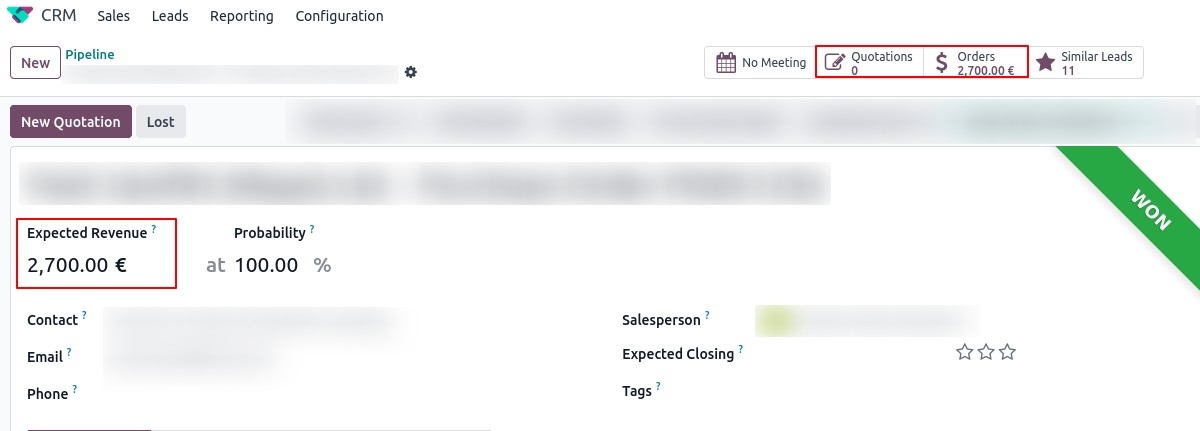
To resolve these issues, Numla designed and implemented a fully automated Expected Revenue system for Parnells.
What Was the Requirement?
Parnells needed a smart and reliable way to:
- Automatically calculate revenue from actual sales activity
- Understand the real value of each lead/opportunity
- Prioritise high-value customers
- Track total revenue generated from CRM leads
Our Custom Solution
We built a powerful automation system that:
Auto-Updates Expected Revenue
- When a quotation is created
- When a sales order is confirmed
The system automatically calculates the total and updates the Expected Revenue field at the CRM (Lead/Opportunity) level.
Intelligent Revenue Aggregation
- Multiple quotations/orders linked to a lead are summed automatically
- Gives a complete financial picture of the opportunity
Smart Adjustment on Cancellation
- If any quotation/order is cancelled, its value is:
- Automatically deducted from Expected Revenue
Ensures 100% accurate and real-time revenue tracking
Multi-Currency Handling
- Orders can be in any currency
- Expected Revenue is always shown in Company Currency
This allows management to:
- View consistent reports
- Analyse revenue easily
- Avoid currency discrepancies
Business Impact for Parnells
After implementing this feature:
- Eliminated manual data entry
- Improved CRM data accuracy
- Saved significant operational time
- Enabled better decision-making
- Increased focus on high-value leads
Result: Higher efficiency + Better revenue visibility = Business growth
How This Automation Works
Here’s how the system works in real-time:
Step 1: Create Quotation or Sales Order
- A quotation or confirmed order is created from a Lead/Opportunity
- The system identifies the linked CRM record
Step 2: Automatic Linking & Calculation
All related quotations/orders are:
- Fetched
- Summed up
Total value is calculated instantly
Step 3: Expected Revenue Update
The calculated amount is:
- Converted into Company Currency
- Updated in the Expected Revenue field
Step 4: Cancellation Handling
If any order is cancelled:
- Its amount is automatically removed
- Expected Revenue is recalculated
Step 5: Smart UI Enhancements
We also enhanced usability with:
Magic Buttons on Lead Form:
- View total quotations
- View total sales orders
- See counts instantly
Clear visibility of:
- Total order value
- Number of transactions
Before & After: Impact on CRM Performance
This customisation transforms CRM into a data-driven revenue engine.
Without This Feature (Default Odoo)
- Manual Expected Revenue entry
- High chances of errors
- No real-time updates
- Poor forecasting
With Numla’s Custom Solution
- Fully automated revenue calculation
- Real-time updates
- Accurate forecasting
- Better sales prioritisation
- Data-driven decisions
Final Thoughts
Automating Expected Revenue in Odoo is not just a feature—it’s a strategic advantage.
With real-time insights, accurate forecasting, and seamless automation, your CRM becomes a powerful tool for driving revenue and growth.