Today, a business website needs to do more than present information. Businesses need their websites to work closely with sales, inventory, CRM, customer support, marketing, and day-to-day operations.
This is where Odoo can make a real difference.
Odoo Website allows businesses to build professional websites and online stores while connecting website activities with other business processes, including CRM, sales, inventory, invoicing, and customer support. Depending on the apps installed and the required configuration, businesses can manage these activities through a single platform instead of maintaining separate systems for every function.
For example, when a customer places an online order, the order, customer information, payment, inventory, and other related processes can be connected to the same system. This reduces manual work and makes day-to-day operations easier to manage.
In this article, we explore the types of websites businesses can build with Odoo, its key features, and the steps involved in developing a website around specific business requirements.
Who this is for
Business owners, marketing teams, eCommerce managers, and operations teams evaluating Odoo for website development, online sales, lead generation, or customer self-service.
What Can You Build with Odoo?
Odoo offers more than a standard company website. Its Website app can be combined with other Odoo applications to support different business needs.
Corporate Websites
Businesses can create professional websites to present their company, services, products, team, contact information, career opportunities, and other important information.
The visual editor allows users to update text, images, page sections, and other content without requiring a developer for every routine change. Businesses can also customise the website's colours, fonts, layouts, and navigation to match their branding.
eCommerce Websites
Odoo can also be used to build a complete online store.
Businesses can manage products, pricing, inventory, orders, payments, shipping, customers, and other eCommerce processes within the same platform.
An online store can include features such as:
- Product catalogs
- Shopping carts
- Online payments
- Customer accounts
- Discounts and coupons
- Shipping options
- Real-time inventory information
Having these processes connected significantly reduces the manual work involved in keeping an online store and backend operations in sync.
Blogs and Portfolio Websites
Odoo also provides tools for creating blogs and portfolio websites. The built-in content management features make it easier for non-technical teams to publish articles, share company updates, showcase projects, and create content for marketing and SEO.
For consultants, agencies, service providers, and other businesses, this can also be useful for building an online presence and generating new leads.
Event and Registration Websites
Businesses can use Odoo's event module to promote conferences, workshops, training sessions, and other events. Visitors can view event details and register online, while organisers manage attendee information and related communications.
Additional processes, such as invoicing, can also be managed through the same platform with the connected Odoo apps.
Customer Portals
Odoo provides customers with a portal to access information and documents related to their business relationship.
A business can provide customers with a secure online area where customers may be able to:
- View sales orders and order status
- Download invoices
- Access relevant documents
- Submit or follow up on support requests
- View subscription information
Customer portals reduce routine email exchanges by allowing customers to access information themselves.
Booking and Appointment Websites
Service-based businesses can use Odoo's appointment module to let customers view available time slots and schedule appointments online.
Appointment details can connect with calendars, customer records, and other business workflows. This can be useful for consultants, professional service providers, training businesses, and organisations that manage scheduled meetings.
Recruitment Websites
Odoo can also be used to create recruitment pages where candidates can view vacancies and submit applications directly through the website.
With the right apps installed and configured, recruitment teams can then manage job positions, applications, interviews, and related hiring activities within Odoo.
This helps keep hiring activities organised without relying entirely on separate spreadsheets and email threads.
Internal Websites and Knowledge Bases
Websites are not always built for customers. Some businesses also need a central place for employees to access internal information. Odoo's access-controlled pages, knowledge tools, documents, and other applications can support internal information sharing.
For example, businesses may use Odoo to organise procedures, training resources, company documents, and internal guidance.
This gives employees a central place to find important information and resources.
Key Odoo Website Features
Odoo provides a wide range of features that make website creation and ongoing management easier.
Drag-and-Drop Website Editor
Odoo's visual editor uses building blocks that users can add, move, and customise to create page layouts.
These blocks can include text, images, videos, forms, buttons, and other website elements. This approach makes routine page creation and content updates more accessible to non-technical users.
Customisable Templates and Themes
Businesses can start with an existing Odoo website theme and customise it according to their branding. Colours, fonts, layouts, headers, menus, and page structures can be adjusted as needed.
Easy Content Editing and Reusable Blocks
Users can edit website content directly on the page. Text, images, buttons, and other sections can be updated without constantly moving between different backend screens.
Reusable building blocks also help teams maintain a consistent layout across multiple pages. For example, you can reuse service sections, banners, testimonials, and calls to action rather than rebuilding similar elements for every page.
Multiple Websites and Languages
Odoo supports managing multiple websites from the same database. This can be useful for businesses operating across different brands, markets, or business units.
Website-specific settings and content can be configured according to the business's requirements. Multilingual websites can also be configured when the relevant languages are installed. The setup should be planned carefully to manage content, domains, translations, and SEO across different markets.
Mobile-Friendly Design
Modern websites need to work well across desktops, tablets, and mobile devices.
Odoo supports responsive layouts and allows users to preview and adjust their pages for different screen sizes before publishing.
This makes it easier to identify layout and usability issues before the website goes live.
Website Forms and CRM Integration
Website forms can collect inquiries, contact details, and other relevant information. When configured to create CRM leads, these submissions can enter the sales pipeline for assignment, follow-up, and tracking.
This connection reduces the need to transfer information manually from website submissions into a separate CRM system.
Blogging and Content Publishing
Odoo includes built-in blogging capabilities that allow businesses to create and schedule content.
Articles can be prepared in advance and published according to a planned schedule, which can be useful for SEO campaigns, product launches, seasonal content, and ongoing marketing activities.
Access Permissions
Odoo provides user access controls that help businesses manage who can edit website content and access different applications or functions.
For teams where multiple people contribute to a website, permissions should reflect their responsibilities. Content writers, editors, website administrators, and developers may need different levels of access, depending on the publishing workflow.
Interactive Website Elements
Modern websites often include animations, hover effects, scrolling effects, and other interactive elements. Odoo provides options for creating these types of experiences without requiring every visual change to be developed from scratch.
Advanced interactions, specialised layouts, and custom functionality may require HTML, CSS, and JavaScript. The need for customisation depends on the design requirements.
How to Build an Odoo Website
Building any website starts with understanding the business objectives. A typical website development process follows these steps:
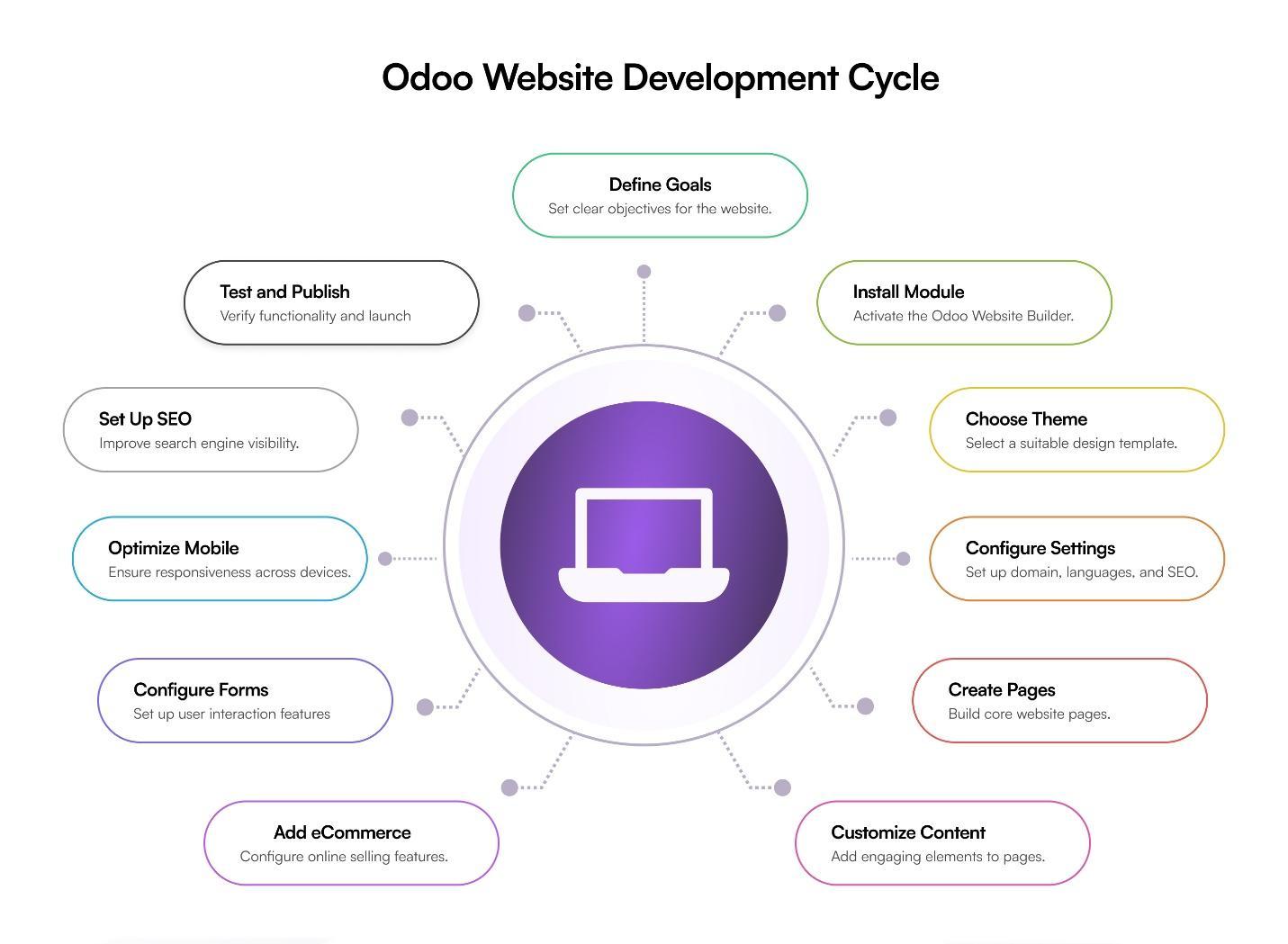
1. Define the Website Goals
Start by deciding what the website needs to accomplish.
Is it simply a company website? Does it need eCommerce? Will customers need a portal? Do you need online bookings, event registration, or lead-generation forms?
Clearly defining these requirements at the beginning helps determine the right website structure and features.
2. Install the Website App
The first technical step is to install the Website app in Odoo.
This provides access to the website builder, themes, page editor, menus, and website settings.
3. Select a Suitable Theme
Choose a starting theme that fits the business and then customise it according to the required branding.
Colours, fonts, layouts, navigation, and other elements can be adjusted to create the desired look and feel.
4. Configure Website Settings
Next, configure the basic website settings.
This can include the domain, languages, navigation menus, contact information, SEO settings, and other important configuration options.
Getting these settings right early helps create a better experience for both visitors and the internal team managing the website.
5. Create the Main Pages
Build the core pages of the website, such as:
- Home
- About Us
- Services
- Products
- Contact
- Blog
The drag-and-drop editor makes it possible to build these pages without heavy development work.
6. Add Content and Customise the Design
Once the basic pages are ready, add the required content and design elements.
This can include banners, images, videos, forms, buttons, testimonials, calls to action, and other website sections.
Reusable snippets can also help keep the design consistent across different pages.
7. Configure eCommerce
If the website will be used for online selling, configure the required eCommerce functionality.
This includes products, pricing, payment methods, shipping, taxes, and the checkout process.
Because these features can be connected with the wider Odoo system, businesses can manage online sales alongside their other operations.
8. Add Customer and Website Features
Depending on the business requirements, additional features can be configured, such as:
- Contact forms
- Appointment booking
- Customer portals
- Newsletter subscriptions
- Event registration
- Lead-generation forms
These features can help businesses improve customer interaction and capture more useful information from website visitors.
9. Optimise for Mobile Devices
Before launching the website, review it on desktop, tablet, and mobile screens.
Check spacing, images, menus, buttons, forms, and page layouts to make sure the website remains easy to use across different devices.
10. Configure SEO and Analytics
SEO should be considered before the website goes live.
Important areas include page titles, URLs, image alt text, redirects, and analytics configuration.
A properly structured website can make it easier for search engines to understand the content and can provide businesses with better visibility into website performance.
11. Test and Launch
Before publishing the website, test the important user journeys.
Check forms, checkout, payments, mobile responsiveness, page loading, links, navigation, and other critical functions.
Once everything has been tested and the required changes are complete, the website can be published.
Is Odoo Website Right for Your Business?
Odoo Website can be a suitable option for businesses that want their website connected to sales, CRM, eCommerce, inventory, and other business processes. It can be particularly useful when a business already uses Odoo or plans to manage several functions within the same platform.
However, not every website project has the same requirements. A simple corporate website may work well with standard building blocks and themes, while a complex customer portal, highly customised eCommerce experience, or specialised integration may require development work.
Before choosing Odoo, consider:
- Which website features are available through standard Odoo applications?
- Which third-party systems need to be integrated?
- How much design customisation is required?
- Who will manage content and website updates after launch?
- What are the expected traffic, performance, security, and scalability requirements?
Answering these questions helps establish a realistic scope and implementation plan before development begins.
Final Thoughts
Odoo website development is about more than creating attractive web pages. The real value comes from connecting the website with the wider business.
With the appropriate apps and configuration, businesses can bring their website, online sales, CRM, inventory, customer service, and other workflows into a more connected environment.
For growing businesses, this connected approach can reduce manual processes, improve visibility, and make it easier to scale operations over time.
With the right planning and a clear understanding of business requirements, Odoo can provide a flexible foundation for building a website that not only looks professional but also supports the way the business actually operates.