Introduction
Businesses today need faster and more efficient ways to communicate with customers. WhatsApp has become one of the most preferred communication channels, making it a powerful tool for customer engagement.
Odoo WhatsApp integration allows businesses to manage conversations, automate messaging, and streamline communication directly within their ERP system.
In this guide, you’ll learn:
- How to integrate WhatsApp with Odoo
- Key features and benefits
- Step-by-step setup using WhatsApp Business API
Why Integrate WhatsApp with Odoo
In today’s digital-first world, communication speed and personalisation define business success. Customers no longer prefer emails or calls; they expect instant responses, and that’s where WhatsApp dominates.
With over 2+ billion active users globally, WhatsApp has become the most powerful communication platform for businesses.
Integrating WhatsApp with Odoo brings your customer conversations directly into your ERP system, making communication smarter, faster, and more efficient.
By integrating WhatsApp with Odoo, businesses can:
- Centralise customer communication
- Automate repetitive messaging
- Improve response time and efficiency
Key Benefits of Odoo WhatsApp Integration
1. Real-Time Customer Communication
Respond instantly to customer queries, order updates, and support requests, directly from Odoo.
2. Automated Messaging
- Send order confirmations
- Delivery updates
- Payment reminders
- Follow-ups
All automated based on business workflows.
3. Centralised Communication Hub
All WhatsApp conversations are stored inside Odoo:
- Linked with customers
- Linked with sales orders
- Easily accessible for teams
4. Improved Customer Experience
Customers prefer WhatsApp over email—this leads to:
- Higher response rates
- Better engagement
- Increased customer satisfaction
5. Boost Sales Conversion
Quick replies = higher conversion rates
Automated follow-ups = more closed deals
6. Multi-Department Usage
Sales Teams → Lead follow-ups
Support Teams → Ticket resolution
Accounting → Payment reminders
7. Template-Based Messaging
Create reusable message templates for:
- Promotions
- Order updates
- Customer onboarding
Features of Odoo WhatsApp Integration
Odoo provides several built-in capabilities for WhatsApp integration:
- WhatsApp message templates (approved templates)
- Direct messaging from CRM, Sales, and Invoices
- Automated workflow-based messaging
- Chat history tracking
- Integration with contacts and leads
- Multi-user communication handling
- Secure API-based communication via WhatsApp Business
How to Set Up Odoo WhatsApp Integration
Setting up Odoo WhatsApp integration requires configuring the WhatsApp Business API. Follow these steps:
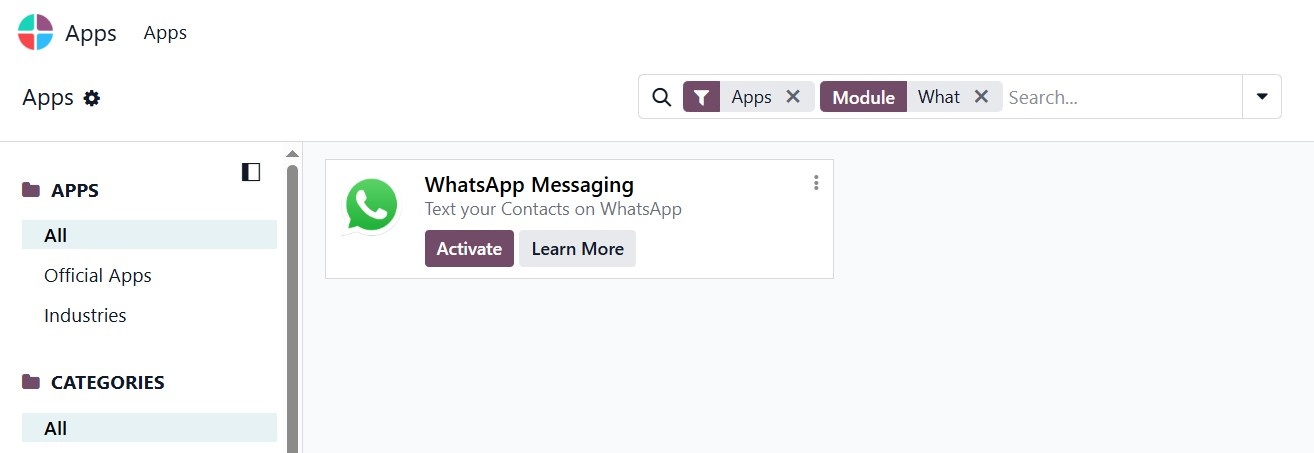
Step 1: Install the WhatsApp Module in Odoo
- Go to Apps in Odoo
- Search for "WhatsApp"
- Install the WhatsApp integration module
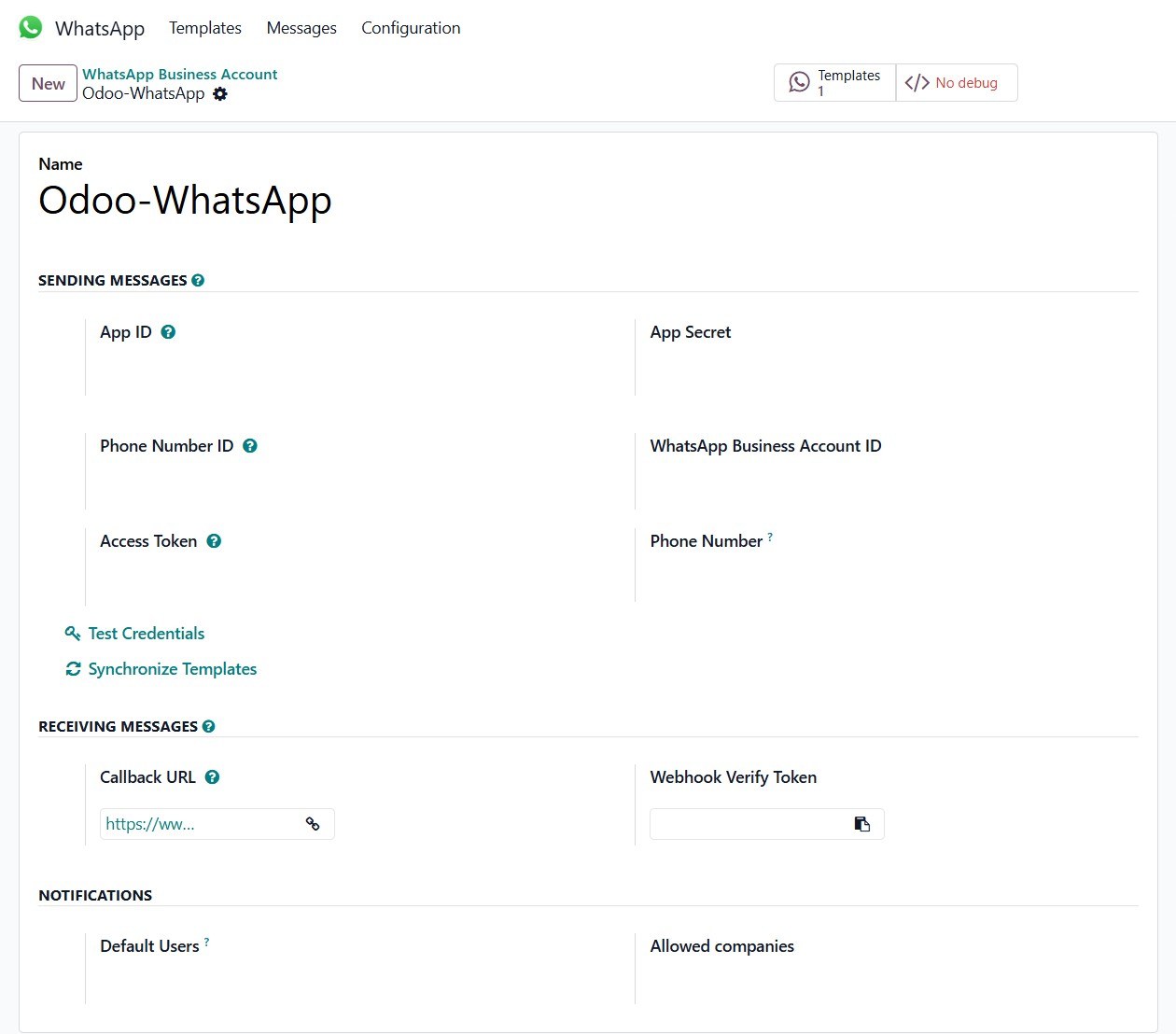
Step 2: Connect WhatsApp Business Account
To use WhatsApp in Odoo, you need:
- A verified WhatsApp Business Account
- Access to WhatsApp Business API (via Meta)
Configure:
- Business Account ID
- Phone Number
- API credentials
Useful Links
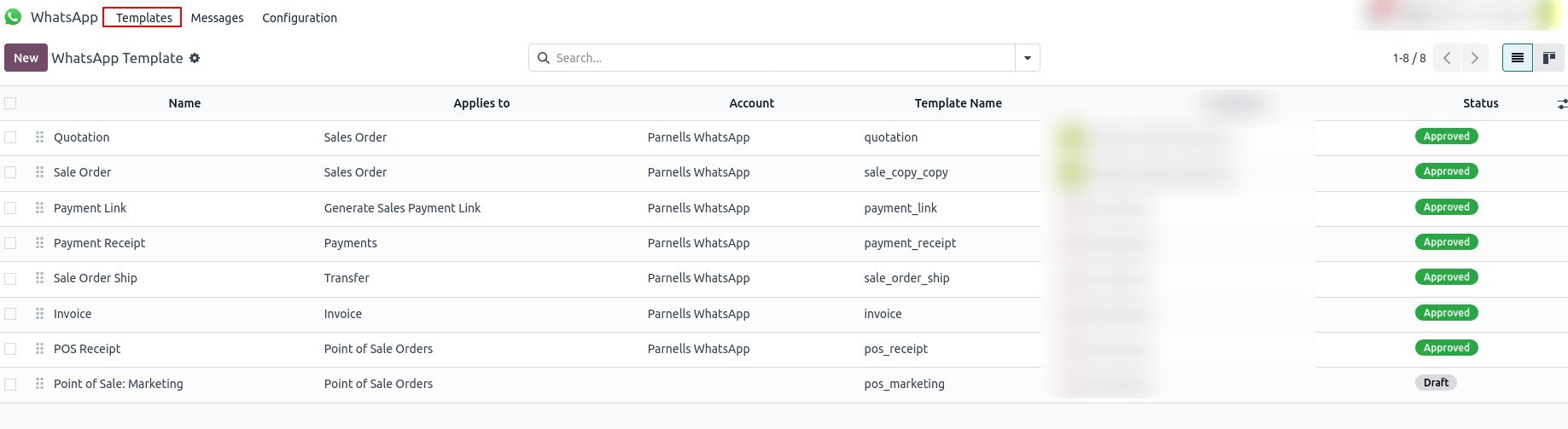
Step 3: Configure Messaging Templates
WhatsApp requires pre-approved templates for outbound messages. In Odoo:
- Create message templates
- Submit for approval
- Use them in automated workflows
Examples:
- Order confirmation
- Shipping updates
- Payment reminders
Useful Links
Step 4: Link WhatsApp with Business Modules
Connect WhatsApp with:
- CRM → Send messages to leads
- Sales → Notify customers about orders
- Invoicing → Send payment reminders
- Helpdesk → Provide support
Step 5: Automate Messaging Workflows
Set automation rules such as:
- When an order is confirmed → Send WhatsApp message
- When an invoice is generated → Notify customer
- When delivery is shipped → Send tracking details
Step 6: Assign Teams & Manage Conversations
- Assign chats to team members
- Track communication history
- Ensure timely responses and no missed messages
Step 7: Ensure Compliance & Security
- Use only approved templates
- Follow WhatsApp Business policies
- Secure API configuration
Why Your Business Needs This Integration Now
Businesses that adopt WhatsApp integration see:
- Faster response time
- Better customer engagement
- Higher conversion rates
- Stronger customer relationships
In short, WhatsApp is no longer optional; it’s a business necessity.
Final Thoughts
Odoo WhatsApp Integration bridges the gap between customer expectations and business operations, making communication seamless, automated, and highly effective. If you want to stay ahead in today’s competitive market, this integration is a must-have.
By following the steps above, you can successfully integrate WhatsApp with Odoo and start managing customer interactions more efficiently.