Odoo 20 changes how people are meant to work with the software. Instead of one chatbot added on the side, every user gets a set of AI agents that can search the database, update records, read documents and, if you set them up that way, run on a schedule without anyone asking.
This article covers what the agents do, how approval and permissions work, how to build your own agent, and what to know about MCP, privacy and cost. Some of what was shown may need configuration, and a few items are Odoo’s future plans. We flag those as we go.
What is Odoo AI, and what makes it agentic?
Odoo AI is the main assistant in Odoo 20. It is a sidekick that is always there when you need it. You open a chat inside your database and ask for what you need in plain language.
“Agentic” means the AI does work rather than just answering questions. A chatbot replies with text. An agent has tools: it can open files, search, read menus and records, and propose changes. It also differs from a traditional automation rule, which only does what someone configured in advance.
Consider a simple example: reassign all your opportunities to Mark. Odoo has no dedicated "reassign opportunities" feature or a specific script to handle this request. Its structured operations allow the AI agent to explore the available functionality, navigate menus, search the database and work out which fields need to be changed.
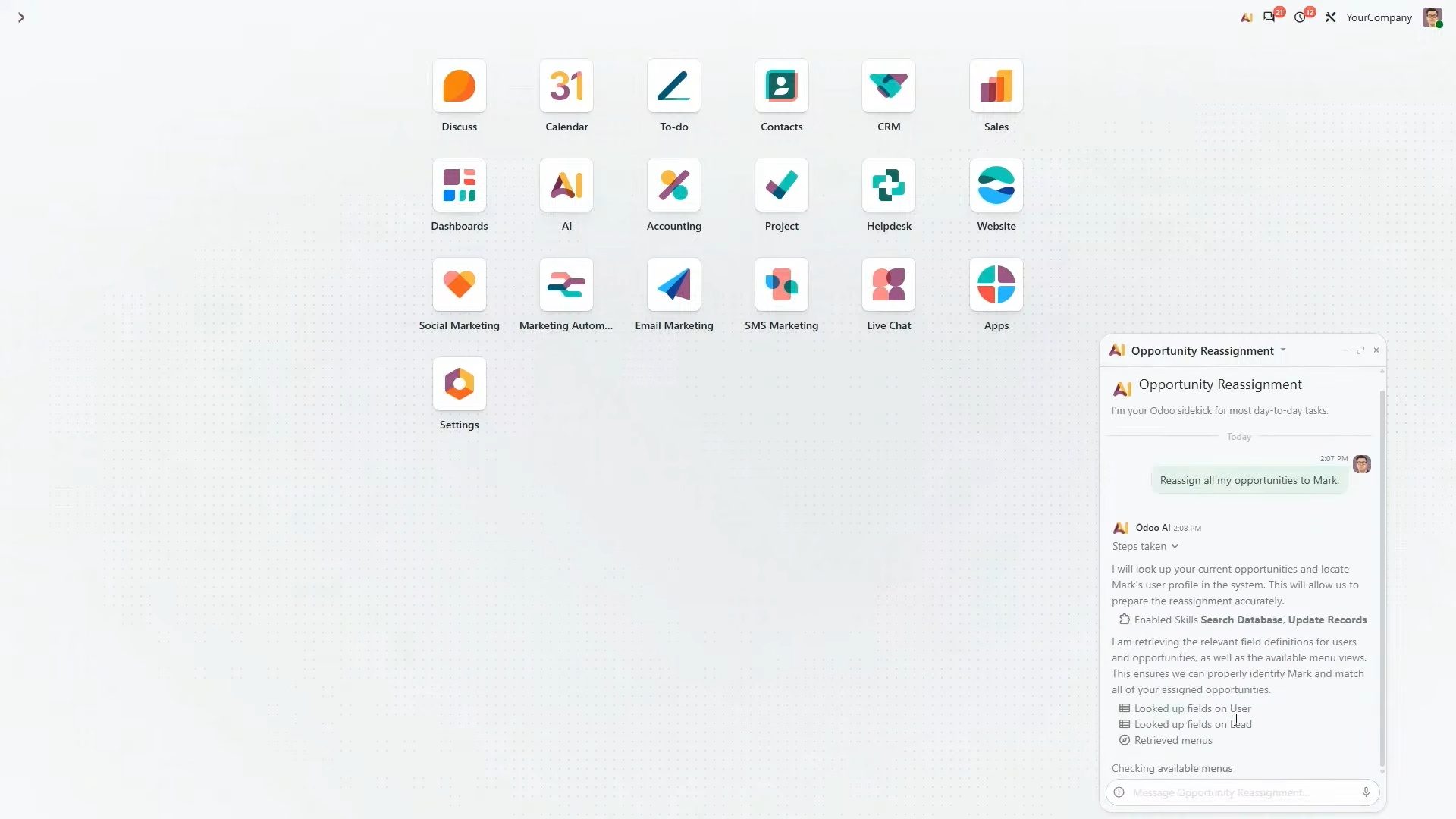
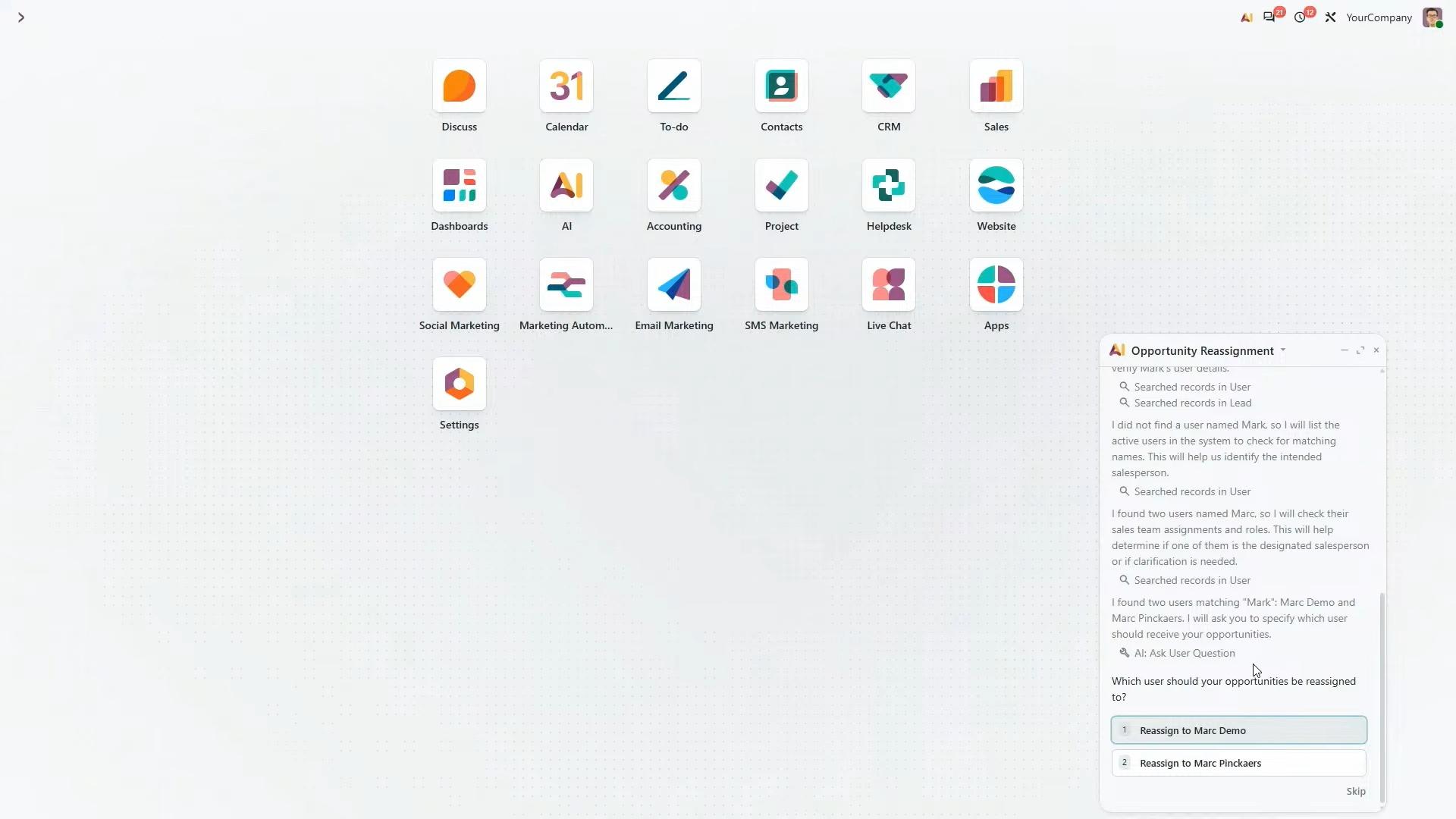
The agent also handles ambiguity. If the database contains two employees called Mark, it asks which person you mean instead of guessing. Once you select the correct employee, it prepares the update, and the opportunities are reassigned after approval.
One practical tip: Start a new conversation for each new task so that earlier context does not interfere with your current request.
Human approval and access rights
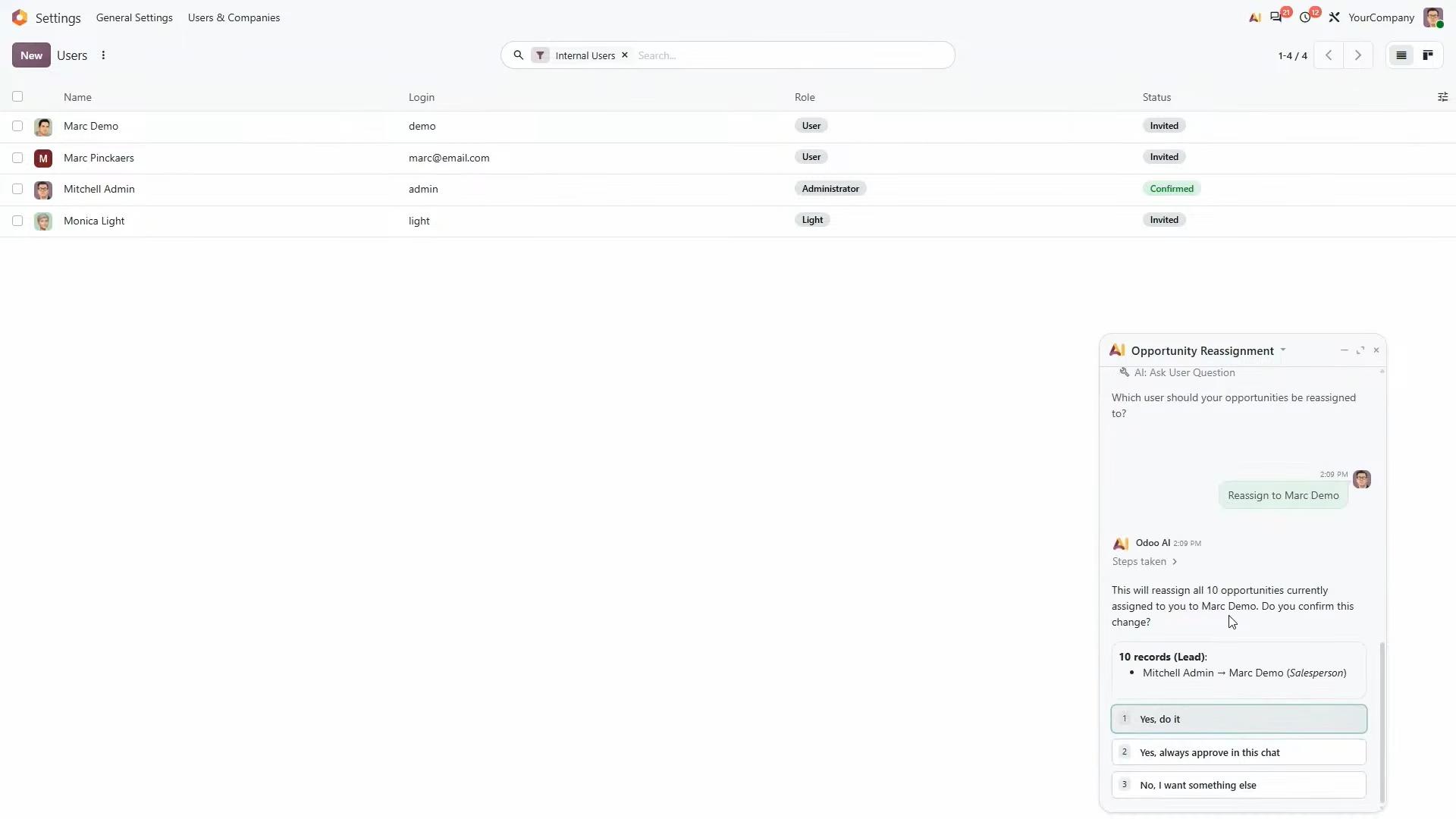
An agent in Odoo does not perform an operation without your approval. Before it acts, you can see what it is about to do and choose one of three responses:
- Approve it this time.
- Approve it and stop asking for the rest of the conversation.
- Reject it and explain what you meant.
The chat menu also lets you ask the AI to think longer on tricky questions or pre-approve all operations. Pre-approval is particularly useful for familiar tasks, such as working with a file format you regularly use or a prompt you have already tested.
The agent works with your own access rights. If you cannot see a colleague’s payslips, your agent cannot either. It does not get access to the whole database by default. It searches and reads data only when your request needs it. Odoo does not add a separate blacklist on top of this, so the rule is simple: if you can access something, your agent can too. That makes your access rights worth reviewing before you roll AI out to a team.
Changes made by agents are recorded through Odoo's usual tracking functionality. Administrators can also review colleagues' conversations, although these are not visible to them by default.
Working with files
You can give Odoo AI files such as PDFs. It extracts the content and uses it to get something done, for example, creating projects from a document. As with the reassignment example, there is no feature called “create projects from a PDF”. The agent receives the document content, your request and the tools it needs, then works out the steps itself.
Specialised AI agents
Odoo AI is the generalist. For some jobs, Odoo 20 provides specialists, which you can see in the agents list in your database.
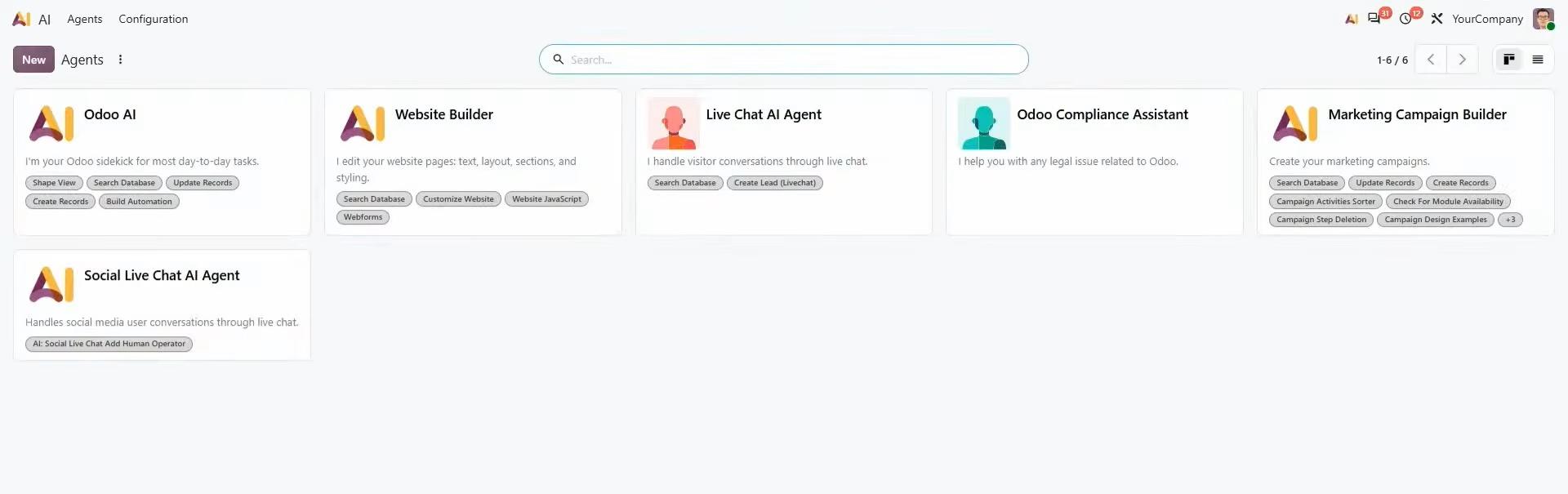
Website agent
It builds a website for you using Odoo’s existing website blocks, so you can keep editing everything by hand afterwards.
Helpdesk agent
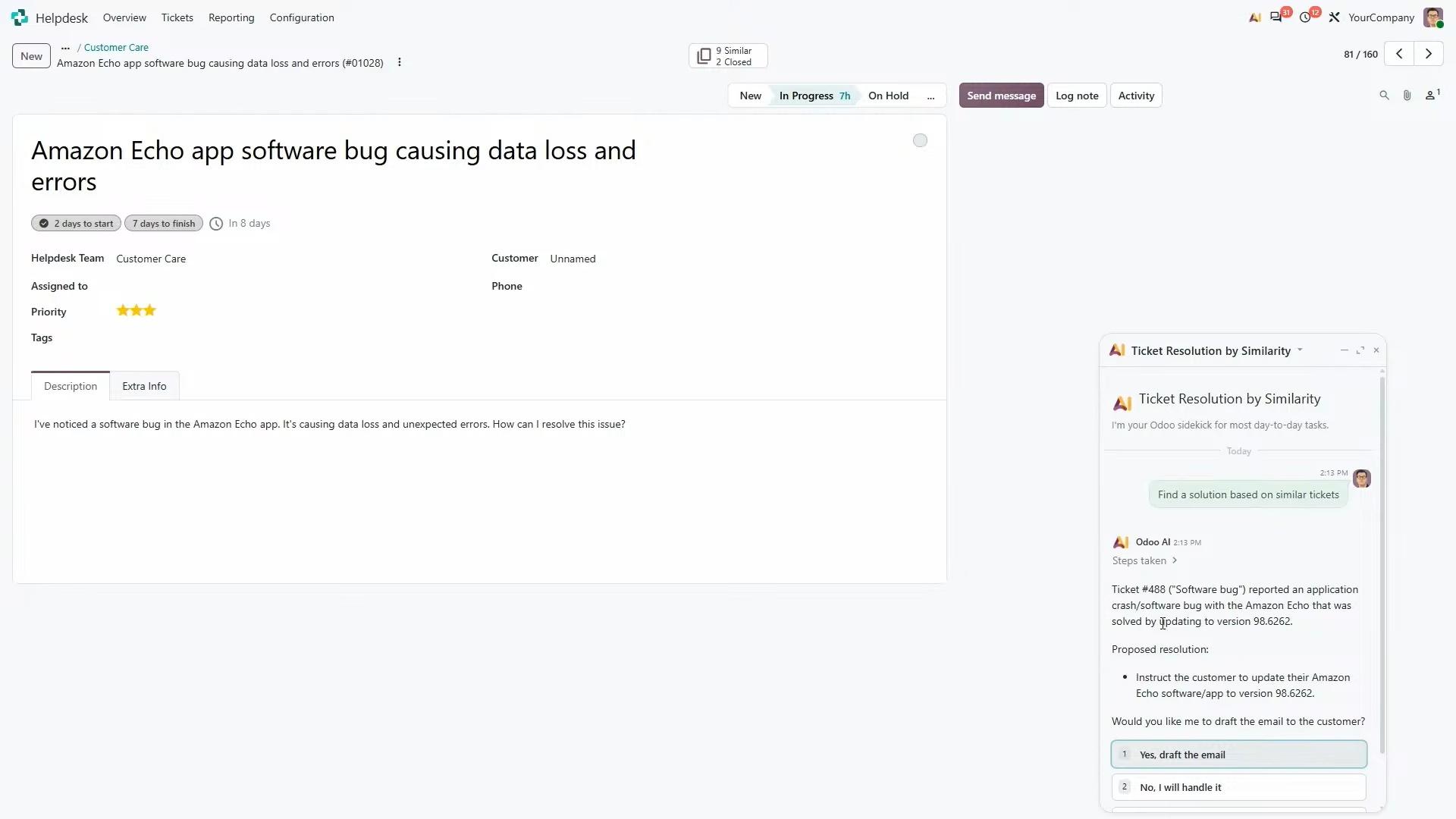
This one came from Odoo’s own need to keep support quality up as ticket numbers grew. When you open a ticket, Odoo shows similar tickets because customers tend to struggle with the same things.
If similar closed tickets exist, you can ask the agent to find a solution. It can review the previous resolutions, explain how to address the current issue and even draft a response for the customer.
For example, if an earlier ticket was resolved by updating the software to a particular version, the agent can identify that solution and prepare an email explaining the required update. You can then review and send the response directly from the ticket.
This allows support teams to reuse existing knowledge instead of investigating the same problems repeatedly.
Accounting agent
It is meant for two groups: accountants who want expert input or a second check on their work, and non-accountants who just want to see how the company is doing.
How to create a custom AI agent in Odoo
An Odoo agent is made of a few parts:
Instructions
The agent’s job description and role, how answers should look, and whether it talks to customers or internal users.
Knowledge
Sources such as your product documentation. For now, Odoo supports web pages, knowledge articles, documents, links and helpdesk tickets. Other records, such as sales orders, are not easy to add through the interface yet.
Skills and tools
What the agent can actually do.
Model
In Odoo 20, AI services run through IAP, the same platform behind OCR and SMS. This lets Odoo pick a suitable model for each request, for instance, a specialised one for images.
Triggers
What starts the agent, such as a scheduled or automated action.
A new agent starts empty: a random name, no instructions, no skills, no knowledge and no triggers. You do not have to configure it by hand. You describe what you need in plain language, and the agent uses a self-update tool, included by default, to ask questions and propose its own instructions, skills and automation. You approve each change.
Scheduled agents: the swimming pool example
Imagine a business that sells cleaning products for swimming pools and wants to identify potential customers in Belgium.
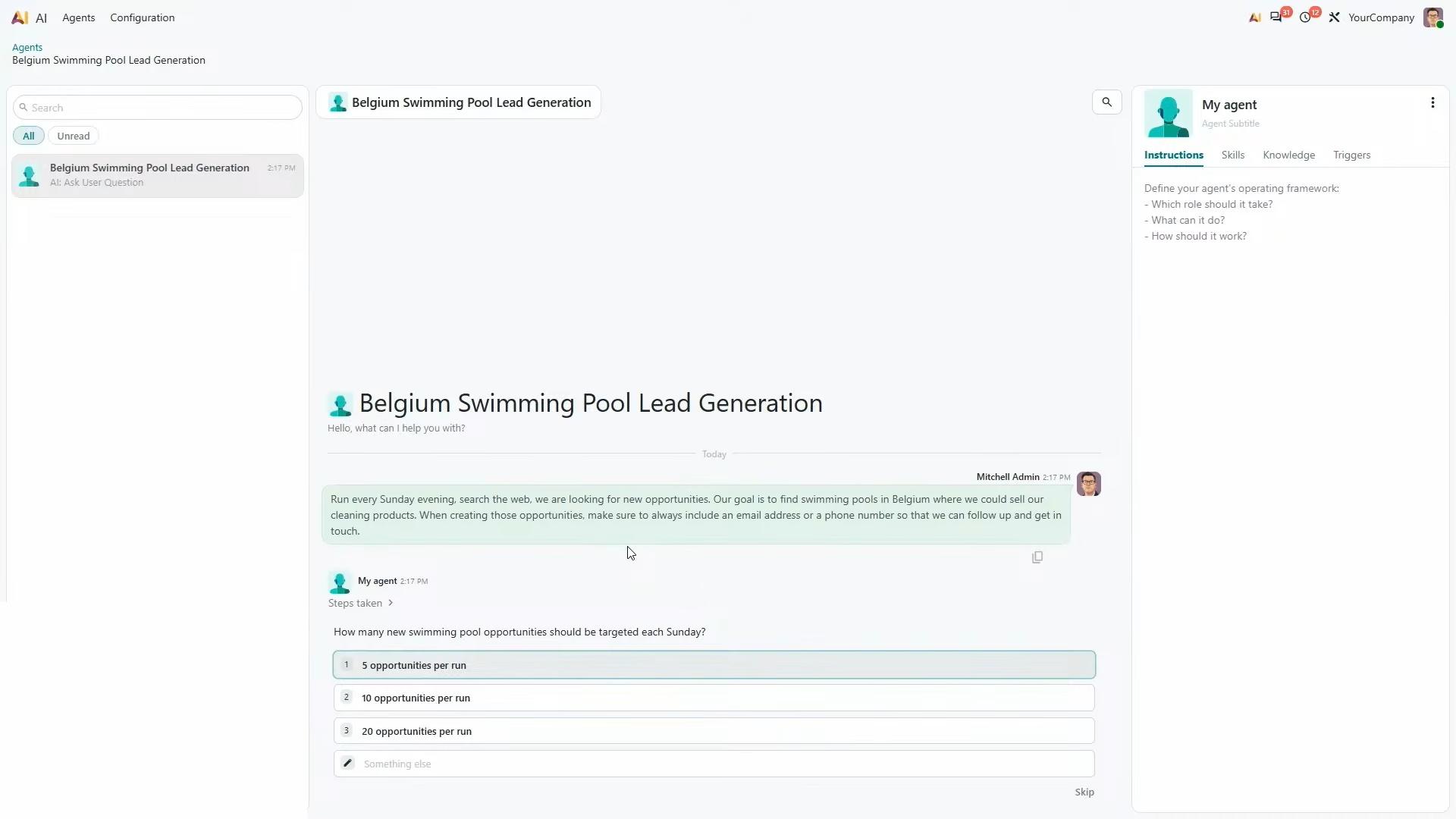
You can create an agent with a simple instruction: Run every Sunday evening, search the web for swimming pools in Belgium where we could sell our cleaning products, and always include an email address or phone number so we can follow up.
The agent can ask how many leads it should create. If the target is five opportunities per run, it can use that information to configure its instructions and select the necessary skills, including the ability to create records.
It can then propose a scheduled action, with the first run on Sunday and a repeat every seven days. Once approved, the automation can run independently and create CRM leads using information gathered online.
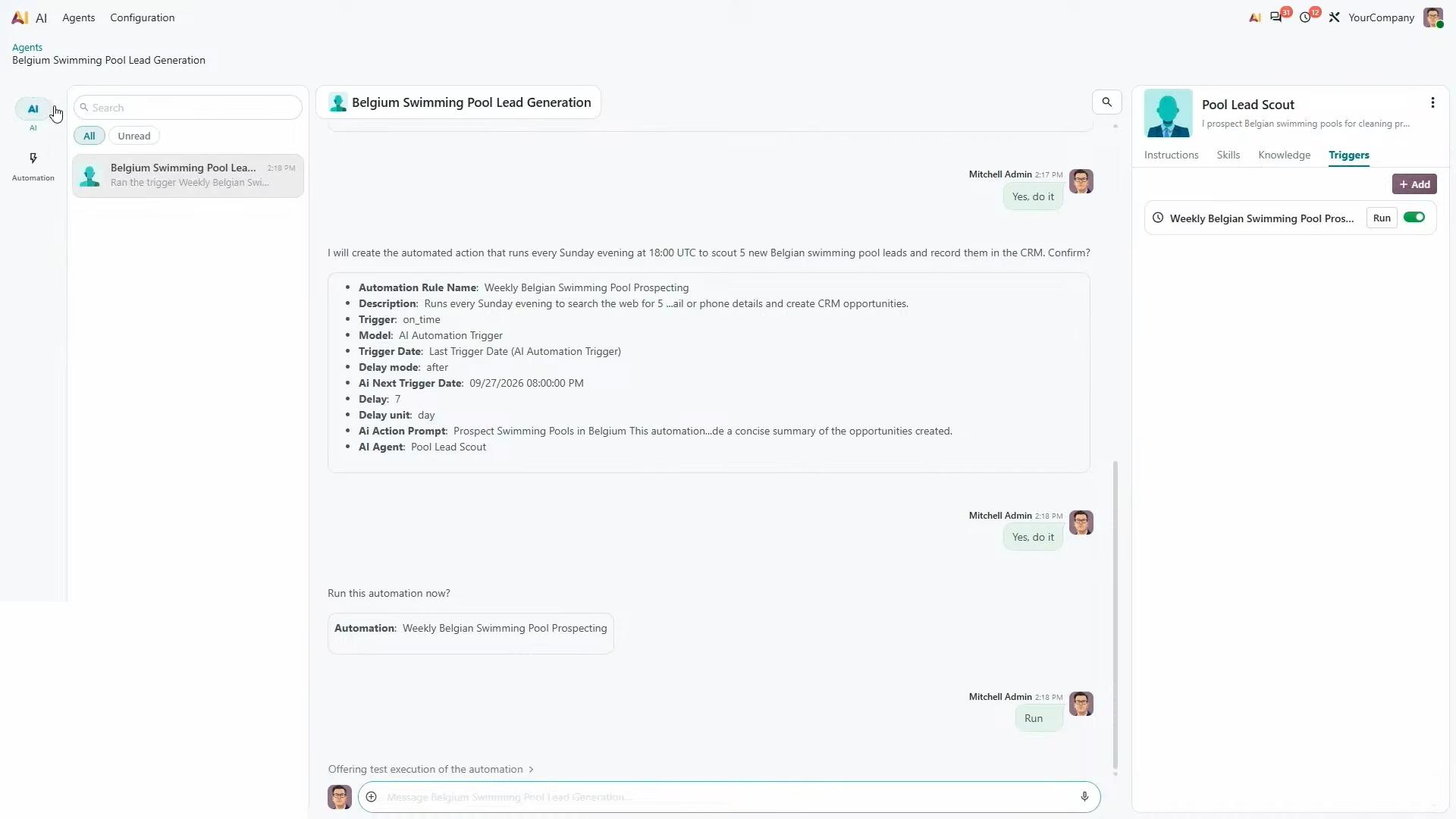
The important difference is who starts the work. When you chat with an agent, you start it. With a trigger, the agent is started by something else, such as a scheduled action or an automation, and works from the instructions attached to that action.
Conversations started by triggers sit in a separate view, so you can check what the agent did. Web research takes time because the agent browses and checks for existing leads. For this reason, running these tasks through scheduled actions is more practical than tying up your screen while the agent works.
MCP and external AI providers
There are two ways to use AI in Odoo. The first works out of the box, with models managed by Odoo. The second lets you use your own contract, key or preferred provider through MCP.
Model Context Protocol (MCP) is an open protocol that standardises how AI systems connect to other systems and tools. It is not a model or a provider. It is the connection that lets an external assistant, such as Claude, work with your Odoo database. Odoo 20 supports MCP integration.
On Odoo Online, you use Odoo’s own managed providers, with models from Google and OpenAI chosen according to the request. A new trial works without connecting any other AI account. The current setup involves creating an API key, although a simpler OAuth-style connection is planned.
For organisations interested in running their own local AI models, MCP also provides a possible route for connecting those models to Odoo. By default, Odoo AI requests go through Odoo's own platform, which centralises AI services and allows the system to use suitable models for different tasks.
Odoo 20 AI: privacy, security and usage costs
Privacy
Odoo says it has enterprise contracts with OpenAI and Google, in which they confirm they do not use this data to train their models.
Organisations with strict data privacy or residency requirements may prefer connecting their own AI models instead of using the default providers. This can be particularly relevant for businesses that cannot allow certain information to be processed on external servers.
The access-rights model also provides an important layer of protection. AI agents operate using the current user's permissions rather than having unrestricted access to the database.
Cost
There is no single price. Cost depends on what you ask: images, long text, transcripts, web searches and the number of records created all use different amounts.
Odoo’s release notes also state that AI features need credits bought through IAP. Odoo says tools to monitor usage are coming soon.
Getting value from Odoo 20 AI
A sensible start is repetitive work that follows a clear pattern: reassigning records, drafting replies from past tickets, or generating leads on a schedule. Test a scheduled agent with a small number of results first, and review access rights before giving agents to a wider team.
AI does not replace every aspect of an ERP implementation. Consultants still play an important role in working with business data, providing training, helping employees adapt to new systems and guiding organisations through implementation challenges.
Similarly, Odoo AI is designed to work with the tasks and information you provide. It does not independently monitor your entire project and proactively identify every potential delay or issue.
Odoo AI is also not intended to replace development tools when building custom applications. Developers can use tools such as Claude Code to assist with writing code and developing custom Odoo modules.
Frequently asked questions
They are assistants inside Odoo that can search data, read files, create and update records and follow instructions. The main one is Odoo AI, and others cover areas such as websites, helpdesk and accounting.
No. Agents ask for approval before an operation. You can approve each action, approve for the rest of a conversation, or pre-approve everything if you choose.
No. It uses the current user’s access rights and does not have blanket access to the database. If you can access a record, your agent can too.
No. AI works out of the box with Odoo’s managed providers. You only need your own account if you want to connect a preferred provider through MCP.
Yes, through MCP, according to Odoo. At the moment, this uses an API key, and Odoo said an easier OAuth-style connection is planned.
It depends on the type and volume of tasks. Odoo’s release notes say AI features need IAP credits.
Yes. An agent can be triggered by a scheduled or automated action, for example, a weekly lead-generation run, and its conversations are kept in a separate view.
Conclusion
Odoo 20 AI is less about a chat window and more about agents that work inside your existing records, permissions and approval steps.
The most useful capabilities include an assistant that asks questions when instructions are ambiguous, Helpdesk agents that reuse solutions from previously resolved tickets, and scheduled agents that can perform recurring tasks independently.
Before you adopt it, check your access rights, understand how credits are charged, and decide whether the default providers or your own model through MCP suit your data requirements.